
A small stage. All yours.
Make a Funny Animated Band Video to Prank a Friend
Upload a photo of your friend to generate a 10-second vertical desk concert video. Cast them as a solo act or add your own photo for a duet, and download the MP4 to share as a prank.
Cast your concert
My creations ↗The desk-concert reference
Reference clip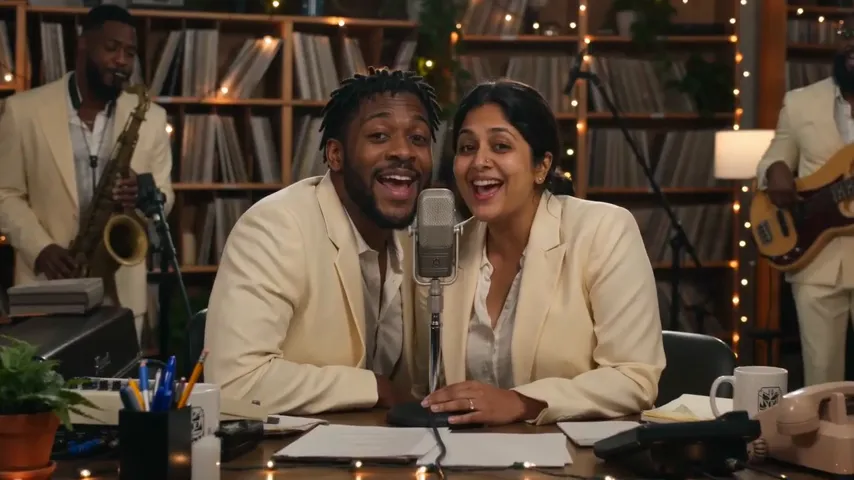
Your turn on the mic
A little room. A whole lot of soul.
A clear photo is the start. Warm shelves, a friendly band, and your moment in the middle.
Cast the lead
One clear, front-facing photo. Bring a second for a friend.
Take the small stage
Books, keys, a microphone. A warm little concert with you in it.
Make it yours
Download a vertical MP4. Choose your soundtrack in your publishing app.
One concert. One purchase.
Solo and duet cost the same. No subscription. Confirm the price before each generation.
Features of the Desk Concert Generator
Review the details of how this tool turns standard photos into short animated band videos.
Vertical Video Format
Every generated video exports as a 10-second vertical MP4 file. The 9:16 aspect ratio fits standard phone screens perfectly, making it ready to upload directly to your preferred social media app. You can send the file directly to your friend in a private message or post it to your public feed for others to see the prank. The short duration ensures the joke lands quickly before they scroll away. You can [make yours](/) right now.
Solo or Duet Options
You can cast your friend as a solo performer using a single photo, or you can create a duet performance. A duet requires exactly two photos, one for each person in the band. Both the solo and duet video options cost the exact same amount to generate, so you can choose the setup that works best for your specific joke. Put two friends together or pair yourself with them.
Standard Image Uploads
The tool accepts standard digital image formats for your uploads. You can use JPG, PNG, or WebP files for the band members. Each individual photo can be up to 10 MB in file size. This allows you to use high-quality photos straight from your phone camera roll or images you have saved directly from your friend's public social media profiles to use in your animated band setup.
One-Time Pricing
Each video generation requires exactly 1250 credits. You get these credits through a $5 one-time purchase, which is processed securely through FloatPass. There are absolutely no ongoing subscriptions to manage or cancel after you make your prank video. You just pay the flat five-dollar fee for the credits you need to generate your specific 10-second concert clip. Check our [Pricing](/pricing) page for more details.
Customizable Audio
The downloaded MP4 file does not include music or a built-in soundtrack. The video provides only the visual desk concert performance. You choose and add the actual song or audio track when you load the video into your chosen social media publishing app. This setup lets you match the visual animation with a specific funny song, a ridiculous voiceover, or an inside joke track that fits your friend perfectly.
Credit Refunds for Errors
Sometimes a technical error happens during the video creation process. If you experience a confirmed failed generation, the tool automatically returns the 1250 credits back to your balance. You do not lose your $5 purchase if the system fails to make the clip on the first try. You can simply try uploading the photo again or pick a different picture to finish making your animated prank video.
How to Make Your Prank Video
Gather the Photos
Find a funny picture of your friend for a solo act, or grab two photos if you want to make a duet. Ensure the files are JPG, PNG, or WebP and under 10 MB each.
Upload and Pay
Go to the generator and upload your images. Purchase your 1250 credits for $5 via FloatPass. There is no subscription required to proceed with your one-time desk concert creation.
Generate and Download
Wait for the tool to process the photos and create the 10-second vertical MP4. Once the process finishes, download the final video file directly to your computer or your mobile phone.
Add Music and Share
Open your favorite social media publishing app, load the downloaded MP4, and select a funny soundtrack. Send it directly to your friend or post it online for others to enjoy.
Ways to Prank Your Friends with a Desk Concert
Birthday Roast
For a friend's birthday, find an embarrassing old photo of them. Upload it to create a solo 10-second vertical MP4 desk concert. When you post it to their social media timeline, add a terrible rendition of a birthday song using your publishing app. It serves as a highly unique and humorous alternative to a standard paper greeting card or a generic text message.
Coworker Send-Off
When a coworker leaves for a new job, use a picture from their professional profile. Generate a solo desk concert and download the MP4 file. Share the 10-second video in the team group chat and overlay a dramatic, sad song in your app. It provides a funny, lighthearted way to say goodbye to a colleague without needing any expensive farewell gifts.
Couple Anniversary Joke
Take a photo of your partner and a photo of yourself to make a duet video. Spend the 1250 credits to generate the 10-second animated band clip. Add a cheesy romantic song in your social media app and send it to them directly in a private message. It is a quick $5 prank to celebrate your anniversary with a laugh instead of a serious post.
Fantasy Football Loser
Punish the last-place loser of your fantasy sports league by turning their profile picture into a desk concert. Create the vertical MP4 and post it to the league message board. Add a ridiculous loser anthem in your publishing app. The $5 one-time purchase is an easy way to enforce a digital punishment that the entire league can watch and laugh at together.
Sibling Rivalry
Grab a terrible selfie your brother or sister posted recently. Turn it into a solo concert using the generator. Download the 10-second MP4 and post it to your family group chat. Because the tool does not include music and you add the audio yourself, you can pick the most annoying song possible in your app to complete the perfect sibling prank.
A few things to know.
How much does it cost to make a prank video?
Making a desk concert video costs exactly 1250 credits. You can purchase these credits for a $5 one-time fee. The payment is securely processed through FloatPass. There are absolutely no subscriptions involved, so you only pay for the specific video you want to make to prank your friend. Both the solo and duet video options cost the exact same amount of credits to generate.
Can I include two friends in the same video?
Yes, you can create a duet video to include two people in your animated band. To do this, you will need to upload two separate photos, providing one photo for each person you want to cast. The duet option creates a 10-second vertical MP4 featuring both individuals performing together. Just like the solo option, generating a duet costs 1250 credits, which is a $5 one-time purchase.
What kind of photos do I need to upload?
You need to upload standard digital image files for the generator to work properly. The supported file types are JPG, PNG, and WebP formats. Each individual photo you upload can be up to 10 MB in file size. A solo video requires exactly one photo, while a duet requires two photos. Ensure your images meet these specific size and format requirements before you start the video generation process.
Does the video come with funny music included?
No, the generated video clip does not include any music or audio track. The tool provides a 10-second vertical MP4 of the visual desk concert animation only. To add funny music to your prank, you will need to choose and apply a soundtrack within your chosen social media publishing app before you post or send the final video to your friend.
What happens if the video generation fails?
If you encounter a confirmed failed generation while trying to make your video, the system will automatically return your 1250 credits to your balance. This means you do not lose your $5 one-time purchase if the tool encounters a technical error. You can use those refunded credits to try uploading the photo again and successfully generate your 10-second MP4 prank video.
Will I be charged a monthly fee for this tool?
No, there are absolutely no ongoing monthly fees or subscriptions associated with this tool. You operate entirely on a straightforward credit system. Generating a video costs 1250 credits, which you acquire through a simple $5 one-time purchase via FloatPass. You only pay when you decide you want to make a new solo or duet video to prank someone, making it completely commitment-free.
What format is the final downloaded video?
Every video you generate and download from the tool is delivered as an MP4 file. The video is formatted as a vertical clip with a 9:16 aspect ratio, which is specifically designed to fit standard smartphone screens perfectly. Each generated file is exactly 10 seconds long, making it a short and easily shareable file for posting directly to your favorite social media platforms.